Complete Guide to School Bus GPS Tracking in India 2026
By Velosyss Team · 5 May 2026
School Bus GPS Tracking System in India — Parent Guide & School Checklist
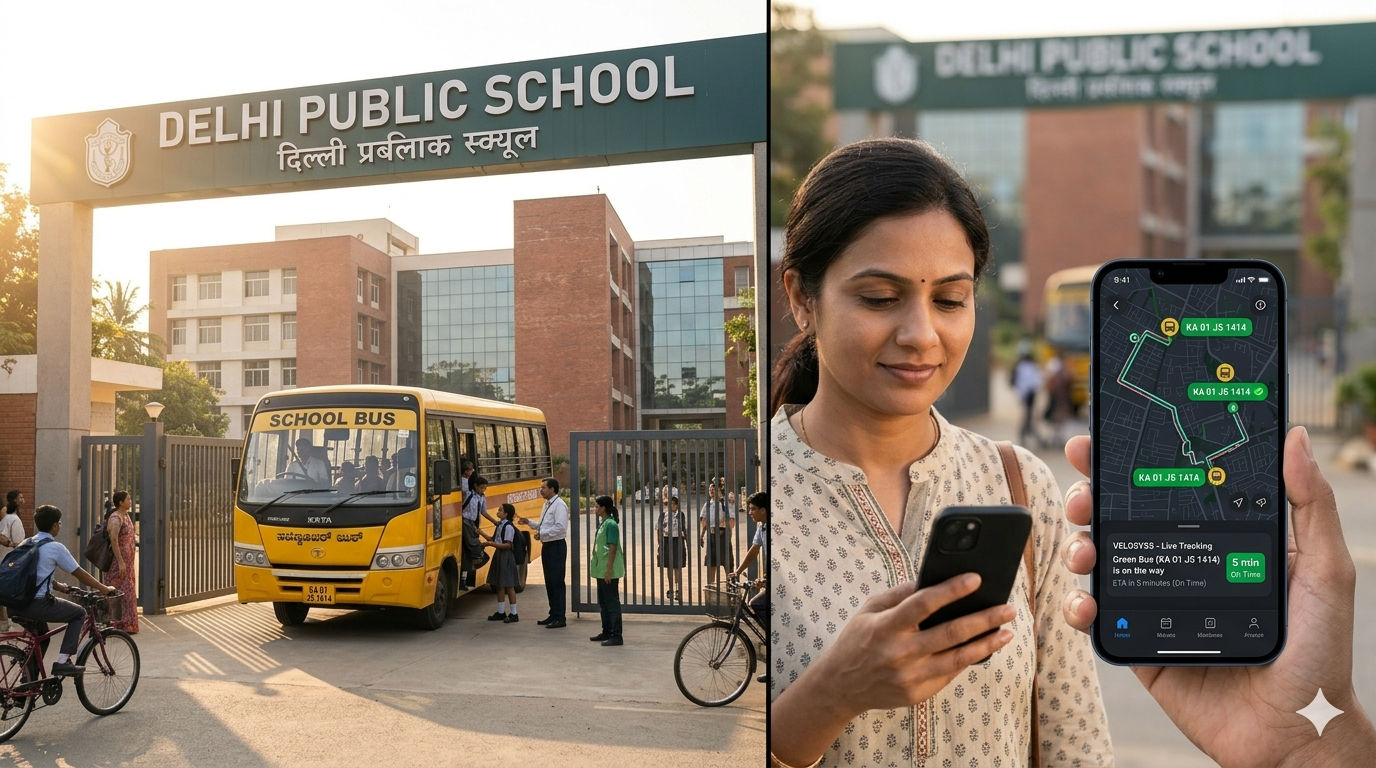
Is your child's school bus on time? You shouldn't have to call the school at 3:15 PM to find out.
For thousands of parents across Indian cities, the school bus ride is a source of daily anxiety. You put your child on the bus at the pickup point. Then silence. No update. No visibility. If the bus is 10 minutes late, you don't know if it's traffic, a breakdown, or something worse.
Schools face pressure from both sides: parents want arrival updates; operators need proof that routes are followed.
A GPS tracking system on school buses solves this — but only if it's set up correctly.
This guide explains how school bus GPS tracking works, what features actually matter for safety and accountability, and how to set it up so parents get the visibility they need.
Why School Bus Tracking Is Different From Fleet Tracking
When you search for "fleet GPS tracking," you get results for delivery companies and logistics firms. School bus tracking is different.
A delivery vehicle carries packages. If the package is late, the customer is inconvenienced.
A school bus carries children. If the bus is late, or if it takes an unexpected route, or if it stops somewhere unexpectedly, the stakes are existential for parents.
That's why school bus tracking is not just about "knowing where the vehicle is." It's about:
- Real-time parent confidence — Parents get an update the moment the bus enters their neighbourhood
- Route accountability — The operator can prove the bus followed the planned route
- Incident proof — If something happens, there's an objective GPS record
What a GPS School Bus Tracking System Does
A modern GPS tracking system on a school bus gives you three core capabilities:
1. Live Map — See the Bus Moving in Real Time
The tracking platform shows a live map of the bus's current location. The map updates every few seconds (not every minute or every 5 minutes — actually every few seconds). This means:
- Parents can see the bus is 2 km away
- Parents can see the bus is approaching the neighbourhood
- Parents can see the bus has arrived and is parked at a stop
This is not a delayed estimate. This is real-time visibility powered by satellite GPS and mobile network data sent from the bus to your phone.
2. Arrival & Departure Alerts Using Geofencing
The school sets up two "geofence zones" on the map:
- A zone around the school
- A zone around each major pickup stop
When the bus enters or exits these zones, the system sends an instant notification (push notification + SMS/email, depending on settings).
What a parent sees:
- 8:10 AM: "Bus #5 has left the school. ETA your stop in 8 minutes."
- 8:18 AM: "Bus #5 is at your stop. Your child will board now."
- 4:15 PM: "Bus #5 has left the school. ETA your home stop in 12 minutes."
- 4:27 PM: "Bus #5 has arrived at your home stop."
No phone calls needed. No guessing. Just notifications.
3. Route Deviation Alerts & Incident Proof
If a bus takes an unexpected detour or stops somewhere it wasn't supposed to, the system logs it. The school operator receives an alert. Parents can later review the route on the map to confirm the bus stayed on course.
This is useful for two scenarios:
- Safety proof: If a parent is concerned about where the bus went, the operator can show the GPS route and say "Here's exactly where Bus #5 was at every moment."
- Accountability: If a driver decides to make an unauthorized stop or take a shortcut, the GPS record proves it.
How School Bus GPS Tracking Works — Step by Step
Step 1 — Install the GPS Device in the Bus
The GPS device is small — about the size of a car air freshener. It's installed in one of two ways:
OBD Port Installation (Easiest): The bus has an OBD-II diagnostic port under the dashboard (present on most vehicles made after 2000). The GPS device plugs in. No wiring. No tools. Takes 2 minutes. (Some older school buses may not have this port.)
Hardwired Installation (Most Common for Buses): The device is wired to the bus's battery and power supply. This is often preferred for buses because:
- The device stays powered on even when the ignition is off
- If someone tries to disconnect it, a "Power Cut Alert" is sent immediately
- No risk of the device being unplugged accidentally
Installation takes 15–20 minutes and is usually done by a mechanic or the bus operator.
Step 2 — Create Your Account
The school or bus operator creates an account on the Velosyss platform (web or mobile app). Takes under 2 minutes. Email verification is required.
Step 3 — Claim the Device
The operator enters the device's IMEI number (a 15-digit identifier printed on the device). The device is now linked to the account.
Step 4 — Activate a Subscription Plan
The operator chooses a subscription plan. For school buses, the Gold plan is recommended because it includes:
- Geofence zones (up to a limited number)
- Trip history (up to 30 days)
- Real-time push notifications
- Mobile app access for all team members (drivers, office staff, admin)
Pricing note: Plans are per-bus, not per-school. So a 10-bus school transport system costs 10 monthly subscriptions.
Step 5 — Set Up Geofence Zones
The operator or school admin logs into the dashboard and creates geofence zones:
- A circle around the school (e.g., 500-metre radius)
- A circle around each major pickup stop (e.g., 300-metre radius)
- Optional: a polygon around authorized operating zones (the city the bus operates in)
Each geofence takes under 2 minutes to set up. Click the map, drag a circle, name it, save.
Step 6 — Set Up Parent Notifications
The operator configures:
- Which geofence events trigger notifications (entry, exit, or both)
- How notifications are delivered (push notification, email, SMS)
- Alert frequency (immediate, hourly digest, daily digest)
Step 7 — Share Access With Parents
The school invites parents to the tracking portal or mobile app. Parents get a "Viewer" role — they can see the live map and geofence alerts but cannot change any settings.
Parents now see the bus moving on a map in real time, with automatic notifications when the bus enters or leaves key zones.
School Bus Tracking Checklist — 10 Questions to Ask Vendors
1. How Fast Are the Updates?
What to look for: The system should update the bus position every 5–30 seconds, not every minute or every 5 minutes. A 30-second delay is acceptable; a 2-minute delay makes the map nearly useless.
Velosyss: Real-time updates every 5–30 seconds depending on plan (Gold and Platinum plans include faster updates).
2. Is There a Mobile App for Parents?
What to look for: A native mobile app (not just a web browser version) so that notifications work even when the phone is locked, and the app is easy to use on a small screen.
Velosyss: Yes. The Velosyss app is available on Android (primary) and iOS. Push notifications work in the background.
3. What Alert Types Are Available?
What to look for: At minimum: geofence entry/exit, ignition on/off, overspeed, device offline. Nice-to-have: battery low, power cut.
Velosyss: Geofence entry/exit, ignition on/off, overspeed, device offline, power cut, low battery.
4. How Long Is GPS History Stored?
What to look for: At least 30 days of history for accountability and incident review. More is better.
Velosyss: Gold plan: 30 days. Platinum plan: unlimited history.
5. Can I Set Up Geofence Zones?
What to look for: Custom geofence setup so you can define zones around your school, pickup stops, and any areas off-limits.
Velosyss: Yes. Custom circle and polygon geofences. Unlimited geofences on the Platinum plan; limited on the Gold plan.
6. What Is the Total Monthly Cost?
What to look for: Transparent, all-in pricing per bus per month — device, SIM, and subscription. No hidden setup fees.
Velosyss: One-time device cost + monthly subscription per bus. No hidden fees. SIM included. Contact the sales team for the latest pricing.
7. Can Multiple School Staff Members Access the System?
What to look for: Role-based access (Viewer, Operator roles) so different staff members have different permissions.
Velosyss: Yes. Invite team members by email. Assign them Viewer role (can see fleet, cannot change settings) or Operator role (can manage alerts and devices).
8. What Happens If the GPS Signal Is Weak?
What to look for: The system should cache the last known location and resume tracking once the signal is back.
Velosyss: The tracker records the last known position before signal loss. Once the bus exits the weak-signal area, tracking resumes immediately. No data loss.
9. Is This Secure?
What to look for: HTTPS encryption, password security (hashed, not plain text), two-factor authentication (2FA), role-based access.
Velosyss: All data encrypted in transit (HTTPS/TLS). Passwords hashed with BCrypt. Two-factor authentication (TOTP) available. Role-based access control. Tenant data isolation — one school's data cannot be accessed by another.
10. How Do I Get Started? What's the Onboarding Timeline?
What to look for: Under 30 minutes from device unboxing to live tracking. No IT team required.
Velosyss: Device ships pre-configured with SIM and server settings. Install in bus (2–15 minutes). Create account (2 minutes). Claim device (1 minute). Activate subscription (2 minutes). Set up geofence zones (5 minutes per zone). Total: under 30 minutes. Parents can start tracking immediately.
Real-World Scenario: The Difference GPS Tracking Makes
Before GPS Tracking:
- 3:10 PM: Parent realizes the bus is late. No information.
- 3:12 PM: Calls the school. On hold for 3 minutes.
- 3:15 PM: School receptionist checks with the driver's office.
- 3:18 PM: School calls the driver. Driver says, "10 minutes." Parent doesn't know if that's accurate.
- 3:30 PM: Bus still hasn't arrived. Parent calls again.
With GPS Tracking:
- 3:10 PM: Parent opens the Velosyss app. The bus is 8 km away. ETA: 12 minutes. Live location visible on map.
- 3:12 PM: The bus is moving. No need to call.
- 3:18 PM: Notification: "Bus #5 is at the main stop 2 km away. ETA your stop: 6 minutes."
- 3:22 PM: Notification: "Bus #5 has arrived at your pickup stop."
- 3:23 PM: Child boards. Parent has full visibility and peace of mind.
The difference isn't just convenience. It's the elimination of anxiety.
Frequently Asked Questions
Does GPS tracking work during monsoons or poor weather? GPS signals weaken indoors and under dense cloud cover, but the tracker continues to use the mobile network (4G/GSM) to transmit location. The map may show "last known position" briefly if the signal drops, but tracking resumes the moment conditions improve. Coverage is continuous across Indian cities.
Can parents see the exact route, or just the current location? Parents can see the live location (a pin on the map). They can also view the trip history — the full route the bus took — by viewing past trips. This is useful for checking for deviations.
What if the bus breaks down? Will parents still see it on the map? Yes. If the bus breaks down, it stops moving but the GPS continues to report its position. Parents will see the bus stationary on the map. If the bus is towed, the tow vehicle's movement shows on the map.
Is there a minimum number of buses to get started? No. Subscriptions are per-bus. A 3-bus school can start with 3 subscriptions. No minimum fleet size, no setup fees, no long-term contracts.
How much mobile data does the tracking app use? The app is optimized for low-bandwidth connections. The mobile app uses roughly 1–2 MB per hour when actively tracking. For parents checking the app for 5 minutes per day, that's under 100 MB per month.
Is GPS tracking of school buses legal? Absolutely. The school owns the bus and has the right to track it for safety and accountability. Tracking the vehicle itself — not individual students' phones — is standard practice worldwide and is legal in India.
What if a parent doesn't want to track the bus? They don't have to download the app. Participation is voluntary. Parents can opt out of receiving notifications.
What happens at the end of the school year? Can I pause the subscription? Yes. Subscriptions can be paused or resumed without penalty. No long-term lock-in.
Choosing the Right Plan for Your School
| Feature | Silver | Gold | Platinum |
|---|---|---|---|
| Live tracking | ✅ Real-time | ✅ Real-time | ✅ Real-time (5-sec updates) |
| Mobile app for parents | ✅ | ✅ | ✅ |
| Geofence zones | ❌ | Limited (e.g., 5 zones) | Unlimited |
| Trip history | 3 days | 30 days | Unlimited |
| Push notifications | ✅ | ✅ | ✅ |
| Parent team invitations | 1 account | Up to 5 accounts | Unlimited |
| Ignition alerts | ✅ | ✅ | ✅ |
| Overspeed alerts | ✅ | ✅ | ✅ |
For most school bus operations, the Gold plan is recommended — it includes geofence zones (essential for school + home stops), 30 days of trip history, and multi-user team access.
Platinum is the right choice if you need unlimited geofence zones or long-term route history for a large bus fleet.
Getting Started — Next Steps
Setting up GPS tracking on your school buses takes under 30 minutes and requires no technical expertise.
- Get the device — Order online or through a local distributor.
- Install — Plug into OBD port or wire to battery (15 minutes).
- Create account — Sign up on the Velosyss platform (2 minutes).
- Activate subscription — Choose a plan and pay (2 minutes).
- Set up geofence zones — Draw circles around school and major stops (5 minutes each).
- Invite parents — Parents download the app and join themselves.
You're live within 30 minutes.
You're live within 30 minutes. Book a School Transport Demo → Learn how Velosyss can give parents peace of mind and operators accountability.
Compare All Plans → See which subscription tier fits your school's needs.